queres probar algo nuevo? tenes algun lugar para recomendar? ayudame a cargar datos http://pleinu.appspot.com (consejos/quejas bienvenidas)
esta vez empieza desde lo basico y se arma con tu feedback
para los nionios como yo, esta hecho en python sobre appengine usando tubes*
* http://a-series-of-tubes.appspot.com/ y http://github.com/marianoguerra/tubes
Mostrando las entradas con la etiqueta tubes. Mostrar todas las entradas
Mostrando las entradas con la etiqueta tubes. Mostrar todas las entradas
viernes, marzo 12, 2010


viernes, noviembre 20, 2009
webless prototipo final
si viste el post anterior encontraste un poco de codigo de mas, para que lo querria uno?
bue, la idea era hacer algo asi:
uno entra a una pagina, pone una url, escribe un poco de javascript/jquery, aprieta probar y nos trae la pagina de resultado renderizandola en el server en webkit y aplicando el codigo que le dimos.
si el snippet que hicimos nos es util lo podemos guardar y nos da una url que podemos usar para obtener el resultado de esa transformacion cada vez que queramos.
no entendes nada? un ejemplo?
* obtener solo los links de los resultados de la primera pagina de google al buscar X
* sacar la cotizacion del dolar de la pagina de algun diario
es interesante tenerlo limpito y nos puede interesar consumirlo periodicamente o usarlo como entrada a otro programa, incluso podemos combinar varias entradas y armar un mashup en una pagina usando los resultados de varios scripts.
todavia no se entiende? ok, vamos con un par de screenshots...
lo que hacemos es poner esta url: www.google.com/search?q=sublime
y este script:
y darle test, el resultado es:
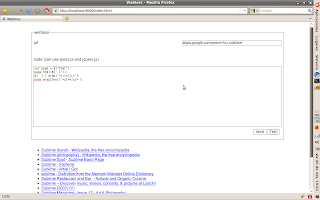
luego elegimos send y lo guarda y nos da una url permanente para accederlo, al hacerlo vemos lo siguiente:
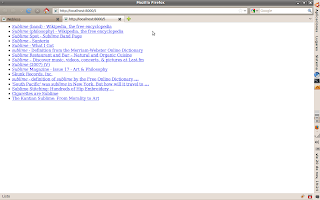
si alguien tiene ganas de seguir jugando con esto o lo hostea en algún lado publico el código por ahí :D
bue, la idea era hacer algo asi:
uno entra a una pagina, pone una url, escribe un poco de javascript/jquery, aprieta probar y nos trae la pagina de resultado renderizandola en el server en webkit y aplicando el codigo que le dimos.
si el snippet que hicimos nos es util lo podemos guardar y nos da una url que podemos usar para obtener el resultado de esa transformacion cada vez que queramos.
no entendes nada? un ejemplo?
* obtener solo los links de los resultados de la primera pagina de google al buscar X
* sacar la cotizacion del dolar de la pagina de algun diario
es interesante tenerlo limpito y nos puede interesar consumirlo periodicamente o usarlo como entrada a otro programa, incluso podemos combinar varias entradas y armar un mashup en una pagina usando los resultados de varios scripts.
todavia no se entiende? ok, vamos con un par de screenshots...
lo que hacemos es poner esta url: www.google.com/search?q=sublime
y este script:
var page = $("html");
page.html($(".l"));
$('.l').wrap('<li></li>');
page.wrapInner('<ul></ul>');
y darle test, el resultado es:
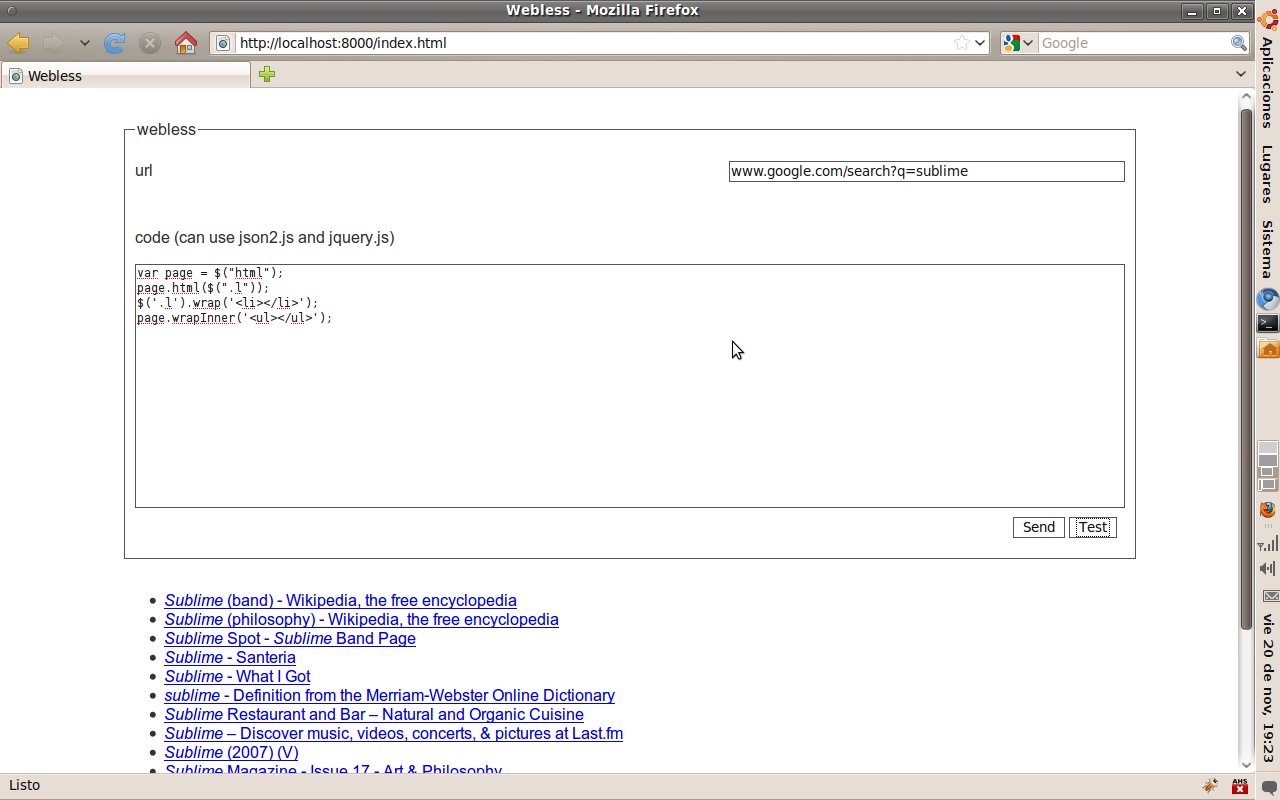
luego elegimos send y lo guarda y nos da una url permanente para accederlo, al hacerlo vemos lo siguiente:

si alguien tiene ganas de seguir jugando con esto o lo hostea en algún lado publico el código por ahí :D
sábado, septiembre 26, 2009
mi nuevo proyecto
...porque llega el momento en la vida de toda persona en la que programa su propio "framework" web en python...
el proyecto se llama tubes y esta hosteado (usando tubes :P) acá:
http://a-series-of-tubes.appspot.com/
los invito a probarlo, divertirse un rato, hacer preguntas del tipo "porque otro framework web en python???" etc etc.
el proyecto se llama tubes y esta hosteado (usando tubes :P) acá:
http://a-series-of-tubes.appspot.com/
los invito a probarlo, divertirse un rato, hacer preguntas del tipo "porque otro framework web en python???" etc etc.
viernes, septiembre 11, 2009
Pubsubhubbub developer's guide
naming conventions
- pshb/PSHB = pubsubhubbub
- gae/GAE = Google App Engine
- things that start with "$" are bash commands
- things that start with "!" are important notes
create directory to hold all the content of this tutorial
$ mkdir pshb
$ cd pshb
download Google App Engine SDK
$ wget http://googleappengine.googlecode.com/files/google_appengine_1.2.4.zip
$ unzip google_appengine_1.2.4.zip
download the latest version of pshb
$ svn checkout http://pubsubhubbub.googlecode.com/svn/trunk/ pubsubhubbub
start pshb
$ python2.5 google_appengine/dev_appserver.py pubsubhubbub/hub/
check that the hub started
type http://localhost:8080 on your browser, you should see something like:
Welcome to the demo PubSubHubbub reference Hub server!

download the example
# we will need to fetch the tubes library and the example that we will be using.
$ git clone git://github.com/marianoguerra/tubes.git

# now we will start the example

$ cd tubes/ihasfriendz/
$ python main.py
 * Running on http://0.0.0.0:8081/
* Restarting with reloader...
components used by the example
- werkzeug: http://werkzeug.pocoo.org
- jquery: http://jquery.com
- tubes: http://github.com/marianoguerra/tubes/tree/master
- pubsubhubbub_publish.py: from pshb
- feedformatter.py: http://code.google.com/p/feedformatter/
publish the feed to the hub
go to the following URL on your browser: http://localhost:8080/publish
on the Topic field enter: http://localhost:8081/atom/stream/_MYUSER_ and click publish

subscribing to the hub
go to the following URL on your browser: http://localhost:8080/subscribe

create some content
go to the following URL on your browser: http://localhost:8081/files/index.html
post some content on the form, use the user you used as MYUSER

you can check that the item was posted going manually to http://localhost:8081/atom/stream/_MYUSER_, you should see an atom feed there

manually processing the tasks

click on the feed-pulls link, there click on the run button.
when we run the feed pulls task, we tell pshb to fetch the feeds that have new content (the ones that did a post to the hub to inform that there is new content)

! on production hubs this tasks are done automatically
now we go again to the Task Queues page, there the event-delivery queue should have a number different than 0 (the number of messages that are pending to be sent to the subscribers), we click on the event-delivery and then we click on the run button.

seeing it work

for lazy people
#!/usr/bin/env sh

# create the example directory
mkdir pshb
cd pshb

CWD=$(pwd)
EXAMPLE=$CWD/tubes/ihasfriendz

wget http://googleappengine.googlecode.com/files/google_appengine_1.2.4.zip
unzip google_appengine_1.2.4.zip

svn checkout http://pubsubhubbub.googlecode.com/svn/trunk/ pubsubhubbub


# we will need to fetch the tubes library and the example that we will be using.
git clone git://github.com/marianoguerra/tubes.git

# now we will start the example

echo "run \"cd $EXAMPLE; python main.py\" on a shell to run the example"
echo "run \"cd $PWD; python2.5 google_appengine/dev_appserver.py pubsubhubbub/hub/\" on a shell to run the hub"
Suscribirse a:
Entradas (Atom)