me mude de blog a mi propio blog, hosteado por mi usando nikola (usalo!)
aca esta la nueva direccion:
http://www.marianoguerra.org/
los espero por allá, a los que siguen este blog por cosas estilo google connect, el blog tiene rss :)
este blog queda acá por razones históricas, para conservar los comentarios (creo que voy a poder migrarlos) y para no romper links (como si alguien linkeara acá)
nos vemos!
viernes, julio 27, 2012


lunes, julio 23, 2012

miércoles, julio 11, 2012
lst - automatizando la adiccion a tener listas de cosas
lst - manage lists in files
I keep lot of lists, usually I edit them with vim, this will end... today.lst is a small program that provides functionality to manipulate lists of things.
https://github.com/marianoguerra/lst/
general help
usage: lst [-h] {add,remove,purge,slice,head,tail,filter,export} ...

positional arguments:
  {add,remove,purge,slice,head,tail,filter,export}
    add                 add an element to a list
    remove              remove element from list
    purge               purge removed items from the file
    slice               show a slice of the list
    head                show the first N elements of the list
    tail                show the last N elements of the list
    filter              show elements that match the filter

optional arguments:
  -h, --help            show this help message and exit
add command
usage: lst add [-h] [-a | -i INDEX] [-t TAG [TAG ...]] LIST MSG [MSG ...]

positional arguments:
  LIST
  MSG

optional arguments:
  -h, --help            show this help message and exit
  -t TAG [TAG ...], --tags TAG [TAG ...]
                        tag message with specified tag
examples
# add item with tags

$  ~  lst add todos do something interesting -t tag1 tag2 tag3
* Tue Jul 10 17:55:46 2012 do something interesting # tag1 tag2 tag3

# add item without tags

$  ~  lst add todos do something else
* Tue Jul 10 17:55:55 2012 do something else
remove command
usage: lst remove [-h] [-a | -i INDEX [INDEX ...]] [-f] LIST

positional arguments:
  LIST

optional arguments:
  -h, --help            show this help message and exit
  -a, --all             remove all elements from list
  -i INDEX [INDEX ...], --index INDEX [INDEX ...]
                        remove elements at index
  -f, --force           don't ask for confirmation
examples
# example items from a list

0 * Tue Jul 10 17:55:46 2012 do something interesting # tag1 tag2 tag3
1 * Tue Jul 10 17:55:55 2012 do something else
2 * Tue Jul 10 17:59:20 2012 conquer the world
3 * Tue Jul 10 17:59:28 2012 do this demo # recursive

# remove the item at index 1

$  ~  lst remove todos -i 1

# result

0 * Tue Jul 10 17:55:46 2012 do something interesting # tag1 tag2 tag3
1 x Tue Jul 10 17:55:55 2012 do something else
2 * Tue Jul 10 17:59:20 2012 conquer the world
3 * Tue Jul 10 17:59:28 2012 do this demo # recursive

# remove items at index 0 and 3
$  ~  lst remove todos -i 0 3

# result

0 x Tue Jul 10 17:55:46 2012 do something interesting # tag1 tag2 tag3
1 x Tue Jul 10 17:55:55 2012 do something else
2 * Tue Jul 10 17:59:20 2012 conquer the world
3 x Tue Jul 10 17:59:28 2012 do this demo # recursive
purge command
usage: lst purge [-h] [-f] LIST

positional arguments:
  LIST

optional arguments:
  -h, --help   show this help message and exit
  -f, --force  don't ask for confirmation
examples
# example items from a list

0 x Tue Jul 10 17:55:46 2012 do something interesting # tag1 tag2 tag3
1 x Tue Jul 10 17:55:55 2012 do something else
2 * Tue Jul 10 17:59:20 2012 conquer the world
3 x Tue Jul 10 17:59:28 2012 do this demo # recursive

$  ~  lst purge todos
are you sure you want to purge the list? [yes/no] yes

# result (removed items are completely removed from the list)

0 * Tue Jul 10 17:59:20 2012 conquer the world
slice command
usage: lst slice [-h] [-a] [-i] LIST BEGIN END STEP

positional arguments:
  LIST
  BEGIN
  END
  STEP

optional arguments:
  -h, --help        show this help message and exit
  -a, --show-all    show removed elements too
  -i, --show-index  show the absolute index of the item
examples
# slice from 0 to 2 with step 1

$  ~  lst slice todos 0 2 1
* Tue Jul 10 17:59:20 2012 conquer the world
* Tue Jul 10 18:02:16 2012 do thing 1

# same as before but displaying index

$  ~  lst slice todos 0 2 1 -i
0 * Tue Jul 10 17:59:20 2012 conquer the world
1 * Tue Jul 10 18:02:16 2012 do thing 1

# slice from 0 to 4 with step 2 showing index

$  ~  lst slice todos 0 4 2 -i
0 * Tue Jul 10 17:59:20 2012 conquer the world
2 * Tue Jul 10 18:02:16 2012 do thing 1

# slice from 0 to 4 with step 1 showing index

$  ~  lst slice todos 0 4 1 -i
0 * Tue Jul 10 17:59:20 2012 conquer the world
1 * Tue Jul 10 18:02:16 2012 do thing 1
3 * Tue Jul 10 18:02:28 2012 do thing 3 # tag task3

# slice from 0 to 4 with step 1 showing index and removed items

$  ~  lst slice todos 0 4 1 -i -a
0 * Tue Jul 10 17:59:20 2012 conquer the world
1 * Tue Jul 10 18:02:16 2012 do thing 1
2 x Tue Jul 10 18:02:19 2012 do thing 2 # tag
3 * Tue Jul 10 18:02:28 2012 do thing 3 # tag task3
head command
usage: lst head [-h] [-a] [-i] [-c COUNT] LIST

positional arguments:
  LIST

optional arguments:
  -h, --help            show this help message and exit
  -a, --show-all        show removed elements too
  -i, --show-index      show the absolute index of the item
  -c COUNT, --count COUNT
examples
# list first items with default count (10)

$  ~  lst head todos
* Tue Jul 10 17:59:20 2012 conquer the world
* Tue Jul 10 18:02:16 2012 do thing 1
* Tue Jul 10 18:02:19 2012 do thing 2 # tag
* Tue Jul 10 18:02:28 2012 do thing 3 # tag task3
* Tue Jul 10 18:02:35 2012 do thing 4 # task task4
* Tue Jul 10 18:02:43 2012 do thing 5 # task

# list first two

$  ~  lst head todos -c 2
* Tue Jul 10 17:59:20 2012 conquer the world
* Tue Jul 10 18:02:16 2012 do thing 1

# list first 4 with index

$  ~  lst head todos -c 4 -i
0 * Tue Jul 10 17:59:20 2012 conquer the world
1 * Tue Jul 10 18:02:16 2012 do thing 1
2 * Tue Jul 10 18:02:19 2012 do thing 2 # tag
3 * Tue Jul 10 18:02:28 2012 do thing 3 # tag task3

# remove one

$  ~  lst remove todos -i 2

# list again (see that item at index 2 is missing)

$  ~  lst head todos -i
0 * Tue Jul 10 17:59:20 2012 conquer the world
1 * Tue Jul 10 18:02:16 2012 do thing 1
3 * Tue Jul 10 18:02:28 2012 do thing 3 # tag task3
4 * Tue Jul 10 18:02:35 2012 do thing 4 # task task4
5 * Tue Jul 10 18:02:43 2012 do thing 5 # task

# list all (see that item at index 2 is marked as removed)

$  ~  lst head todos -i -a
0 * Tue Jul 10 17:59:20 2012 conquer the world
1 * Tue Jul 10 18:02:16 2012 do thing 1
2 x Tue Jul 10 18:02:19 2012 do thing 2 # tag
3 * Tue Jul 10 18:02:28 2012 do thing 3 # tag task3
4 * Tue Jul 10 18:02:35 2012 do thing 4 # task task4
5 * Tue Jul 10 18:02:43 2012 do thing 5 # task
tail command
usage: lst tail [-h] [-a] [-i] [-c COUNT] LIST

positional arguments:
  LIST

optional arguments:
  -h, --help            show this help message and exit
  -a, --show-all        show removed elements too
  -i, --show-index      show the absolute index of the item
  -c COUNT, --count COUNT
examples
# list last items with default count (10)

$  ~  lst tail todos
* Tue Jul 10 17:59:20 2012 conquer the world
* Tue Jul 10 18:02:16 2012 do thing 1
* Tue Jul 10 18:02:28 2012 do thing 3 # tag task3
* Tue Jul 10 18:02:35 2012 do thing 4 # task task4
* Tue Jul 10 18:02:43 2012 do thing 5 # task

# list last two

$  ~  lst tail todos -c 2
* Tue Jul 10 18:02:35 2012 do thing 4 # task task4
* Tue Jul 10 18:02:43 2012 do thing 5 # task

# list last 4 with index

$  ~  lst tail todos -c 4 -i
1 * Tue Jul 10 18:02:16 2012 do thing 1
3 * Tue Jul 10 18:02:28 2012 do thing 3 # tag task3
4 * Tue Jul 10 18:02:35 2012 do thing 4 # task task4
5 * Tue Jul 10 18:02:43 2012 do thing 5 # task

# list all (see that item at index 2 is marked as removed)

$  ~  lst tail todos -c 4 -i -a
2 x Tue Jul 10 18:02:19 2012 do thing 2 # tag
3 * Tue Jul 10 18:02:28 2012 do thing 3 # tag task3
4 * Tue Jul 10 18:02:35 2012 do thing 4 # task task4
5 * Tue Jul 10 18:02:43 2012 do thing 5 # task
filter command
usage: lst filter [-h] [-a] [-i] [-t TAG [TAG ...] | -T TAG [TAG ...]]
                  LIST [QUERY [QUERY ...]]

positional arguments:
  LIST
  QUERY

optional arguments:
  -h, --help            show this help message and exit
  -a, --show-all        show removed elements too
  -i, --show-index      show the absolute index of the item
  -t TAG [TAG ...], --tags TAG [TAG ...]
                        show elements that have *any* of the tags
  -T TAG [TAG ...], --all-tags TAG [TAG ...]
                        show elements that have *all* of the tags
examples
# apply no filter

$  ~  lst filter todos
* Tue Jul 10 17:59:20 2012 conquer the world
* Tue Jul 10 18:02:16 2012 do thing 1
* Tue Jul 10 18:02:28 2012 do thing 3 # tag task3
* Tue Jul 10 18:02:35 2012 do thing 4 # task task4
* Tue Jul 10 18:02:43 2012 do thing 5 # task

# list items that contain the word "thing"

$  ~  lst filter todos thing
* Tue Jul 10 18:02:16 2012 do thing 1
* Tue Jul 10 18:02:28 2012 do thing 3 # tag task3
* Tue Jul 10 18:02:35 2012 do thing 4 # task task4
* Tue Jul 10 18:02:43 2012 do thing 5 # task

# list items that contain the word "thing" or the tag "task"

$  ~  lst filter todos thing -t task
* Tue Jul 10 18:02:16 2012 do thing 1
* Tue Jul 10 18:02:28 2012 do thing 3 # tag task3
* Tue Jul 10 18:02:35 2012 do thing 4 # task task4
* Tue Jul 10 18:02:35 2012 do thing 4 # task task4
* Tue Jul 10 18:02:43 2012 do thing 5 # task
* Tue Jul 10 18:02:43 2012 do thing 5 # task

# list items that contain the tag "task"

$  ~  lst filter todos -t task
* Tue Jul 10 18:02:35 2012 do thing 4 # task task4
* Tue Jul 10 18:02:43 2012 do thing 5 # task

# list items that contain the tag "task" or "tag"

$  ~  lst filter todos -t task tag
* Tue Jul 10 18:02:28 2012 do thing 3 # tag task3
* Tue Jul 10 18:02:35 2012 do thing 4 # task task4
* Tue Jul 10 18:02:43 2012 do thing 5 # task

# list items that contain the tag "task" and "tag"

$  ~  lst filter todos -T task tag

# list items that contain the tag "task" and "task4"

$  ~  lst filter todos -T task task4
* Tue Jul 10 18:02:35 2012 do thing 4 # task task4

# list items that contain the tag "task" or "task4"

$  ~  lst filter todos -t task task4
* Tue Jul 10 18:02:35 2012 do thing 4 # task task4
* Tue Jul 10 18:02:43 2012 do thing 5 # task

# list items that contain the word "world"

$  ~  lst filter todos world
* Tue Jul 10 17:59:20 2012 conquer the world
configuration
by default the configuration is looked up in .config/lstthe file contains a JSON object with the configuration of the program with the following subojects:
lists
the lists object contains as keys the names of the lists that you want to configure and as values the configuration for those lists, for example:if the path to a list doesn't exists it's created:
{
    "lists": {
        "links": {
            "format": "src/me/links/%Y/%m.links" // strftime format can be used
        }
    }
}
fields
- format
- is the path to the list, you can use ~ to refer to the user's home and any format from datetime.strftime
details
license
MIT + optional beer for the authorauthor
marianoguerratools
python 3martes, junio 26, 2012
releases! una unica pagina para seguir las releases de todas tus librerias por web, atom o rss
se me ocurrió ayer (mejor dicho lo necesite ayer), no lo encontré y lo hice.
básicamente es un script que periodicamente chequea en los proyectos de una lista* las versiones y si se actualizaron las agrega a una lista y genera un feed atom y rss, tambien provee una pagina web para ver los ultimos 100 updates, con links y posibilidad de ver detalles y comentar en cada release individual.
todo sin backend, solo generacion de archivos estaticos y javascript en el cliente.
la pagina esta acá: releases!
si querés que agregue alguna librería avisame por algún lado.
* proyectos que tienen un archivo package.json
básicamente es un script que periodicamente chequea en los proyectos de una lista* las versiones y si se actualizaron las agrega a una lista y genera un feed atom y rss, tambien provee una pagina web para ver los ultimos 100 updates, con links y posibilidad de ver detalles y comentar en cada release individual.
todo sin backend, solo generacion de archivos estaticos y javascript en el cliente.
la pagina esta acá: releases!
si querés que agregue alguna librería avisame por algún lado.
* proyectos que tienen un archivo package.json
ya migraste tu modulo a python 3? (aka migrando feedformatter a python 3)
resulta que ayer me puse a hacer una cosa que me hacia falta pero no era "critica" así que decidí hacerla en python3, supuse que a esta altura todo iba a estar mejor, pero me encontré con el primer escollo al buscar un modulo para generar un feed atom ya que feedformatter no anda en python 3.
en lugar de quejarme y volver al querido python 2, me puse un par de horas y lo migre a python 3 y viendo que no era muy difícil hice que el mismo modulo ande para python >= 2.5 (no se si anda en python 2.4 porque no tengo uno a mano)
los invito a mirarlo/probarlo/ayudarme en https://github.com/marianoguerra/feedformatter/
el modulo es bastante simple (y no muy lindamente programado) pero me hacia falta y no estaba.
así que los invito a hacer algo parecido, esta bueno para ejercitar, contribuir algo de vuelta y ayudar a que la gente considere python 3 mas seguido.
ahora lo que me falta es ver si puedo subir el cambio a pypi, no se como se hace y dado que el proyecto no tiene tests no se si rompi algo (mas que probar lo simple), pero bue, es lo que hay.
como me podes ayudar?
* probalo si usaste feedformatter
* bajalo y probalo y fijate si se rompe
* escribí una pequenia guia de uso al estilo pymtw[1] (y avisame)
* agregale unittests!
[1] http://www.doughellmann.com/PyMOTW/py-modindex.html
en lugar de quejarme y volver al querido python 2, me puse un par de horas y lo migre a python 3 y viendo que no era muy difícil hice que el mismo modulo ande para python >= 2.5 (no se si anda en python 2.4 porque no tengo uno a mano)
los invito a mirarlo/probarlo/ayudarme en https://github.com/marianoguerra/feedformatter/
el modulo es bastante simple (y no muy lindamente programado) pero me hacia falta y no estaba.
así que los invito a hacer algo parecido, esta bueno para ejercitar, contribuir algo de vuelta y ayudar a que la gente considere python 3 mas seguido.
ahora lo que me falta es ver si puedo subir el cambio a pypi, no se como se hace y dado que el proyecto no tiene tests no se si rompi algo (mas que probar lo simple), pero bue, es lo que hay.
como me podes ayudar?
* probalo si usaste feedformatter
* bajalo y probalo y fijate si se rompe
* escribí una pequenia guia de uso al estilo pymtw[1] (y avisame)
* agregale unittests!
[1] http://www.doughellmann.com/PyMOTW/py-modindex.html
miércoles, junio 20, 2012
Sobre criticar
In many ways, the work of a critic is easy. We risk very little yet enjoy a position over those who offer up their work and their selves to our judgment. We thrive on negative criticism, which is fun to write and to read.
But the bitter truth we critics must face, is that in the grand scheme of things, the average piece of junk is probably more meaningful than our criticism designating it so.
But there are times when a critic truly risks something, and that is in the discovery and defense of the new.
The world is often unkind to new talent, new creations, the new needs friends
la fuente es la pelicula ratatouille, la cual no vi pero vi el quote por ahi.
sábado, junio 16, 2012
camino a nantes, motorhome, camping, castillos y casamiento
una argentina de los pagos de Florencio Varela conoce a un francés de un pueblo cercano a Nantes ...fast forward... y se casan (no es una biografía de la pareja).

en el medio me conocen por aleatoriedades influenciadas por la agencia de intercambio alemana, lo que motiva por razones desconocidas la invitación de este indigno ser a su casamiento.

la ubicación se establece en un pueblo cercano al origen del futuro esposo, razón por la cual se organizan los amigos provenientes de Stuttgart para cruzar Francia de este a oeste, y aprovechando dicho evento, conocer lugares intermedios.

al protagonista y escritor de este post le toca viajar en una combi totalmente acondicionada para este tipo de actividades con la compañia de su novia y 3 amigos.

el viaje comienza un jueves a bajas horas de la mañana como resultado de una reorganización de ultimo momento por causas desconocidas.
...acá pasan cosas que el autor desconoce ya que durmió como morsa las primeras horas del viaje...

a mitad de camino (y mitad de Francia) comienza una región que se caracteriza por su alta concentración de castillos, razón por la cual aprovechamos para visitar aquellos que no requieran el pago de entrada o que realmente lo justifiquen.

luego de pasear y sacar fotos nos dedicamos a buscar un camping y aprovisionarnos de elementos para realizar, dados los limitados recursos, algo así como un asado.

luego del mismo nos retiramos a descansar para comenzar el día siguiente con visitas a castillos y continuando hacia Nantes.


allí nos hospedamos en algo llamado gite que es algo así como una casa de campo grande que alquila habitaciones.


superadas las limitaciones comunicacionales nos establecemos y desayunamos exitosamente para luego ir hacia el casamiento a realizarse en la cuna del vino Muscadet donde ingerimos cantidades industriales de comida y vino para luego festejar e irnos a dormir.


al día siguiente temprano emprendimos un regreso acelerado debido a la necesidad de algunos de los personajes de esta historia de volver a trabajar al día siguiente.

 fin.
fin.

en el medio me conocen por aleatoriedades influenciadas por la agencia de intercambio alemana, lo que motiva por razones desconocidas la invitación de este indigno ser a su casamiento.

la ubicación se establece en un pueblo cercano al origen del futuro esposo, razón por la cual se organizan los amigos provenientes de Stuttgart para cruzar Francia de este a oeste, y aprovechando dicho evento, conocer lugares intermedios.

al protagonista y escritor de este post le toca viajar en una combi totalmente acondicionada para este tipo de actividades con la compañia de su novia y 3 amigos.

el viaje comienza un jueves a bajas horas de la mañana como resultado de una reorganización de ultimo momento por causas desconocidas.
...acá pasan cosas que el autor desconoce ya que durmió como morsa las primeras horas del viaje...

a mitad de camino (y mitad de Francia) comienza una región que se caracteriza por su alta concentración de castillos, razón por la cual aprovechamos para visitar aquellos que no requieran el pago de entrada o que realmente lo justifiquen.
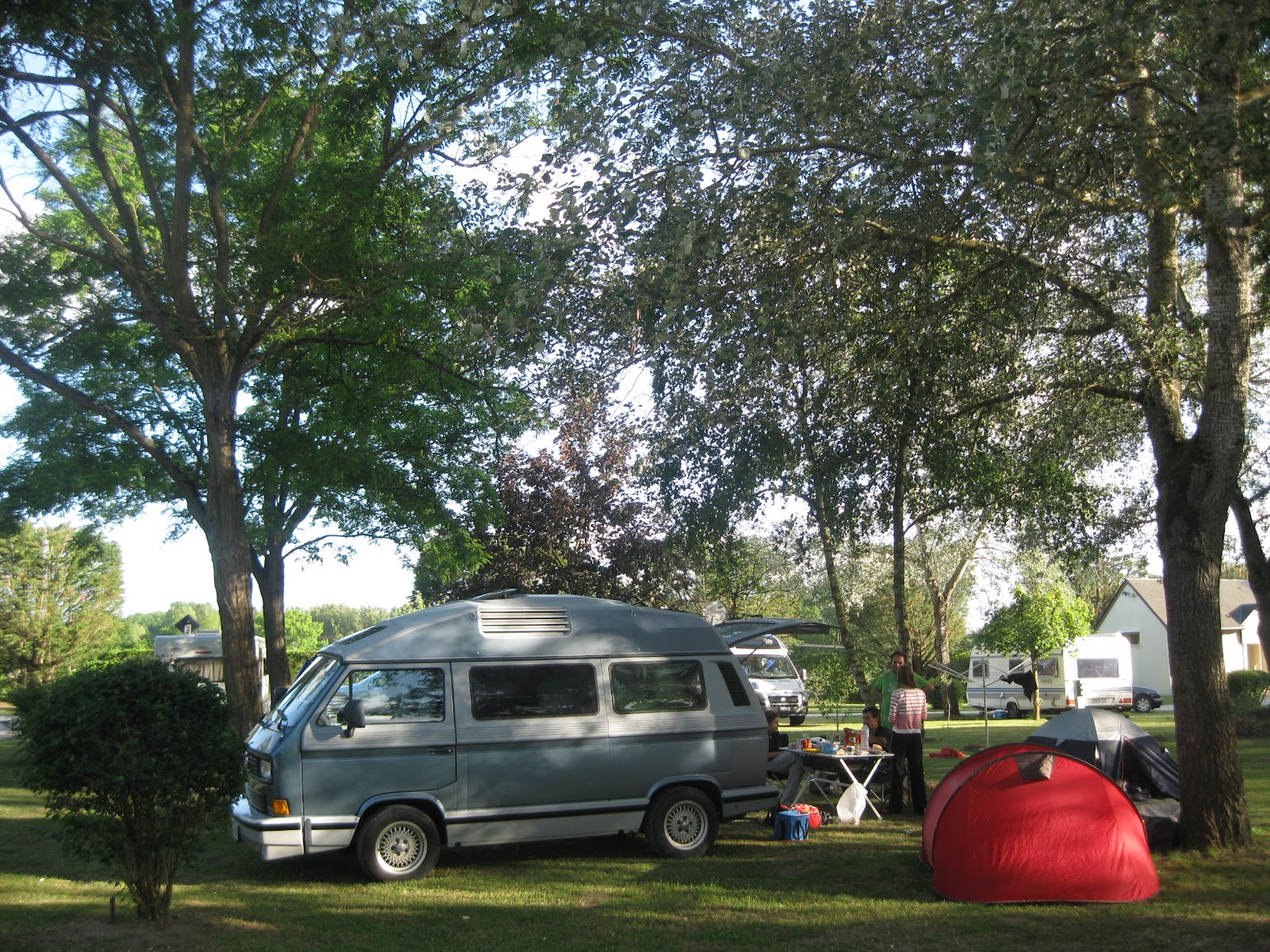
luego de pasear y sacar fotos nos dedicamos a buscar un camping y aprovisionarnos de elementos para realizar, dados los limitados recursos, algo así como un asado.

luego del mismo nos retiramos a descansar para comenzar el día siguiente con visitas a castillos y continuando hacia Nantes.


allí nos hospedamos en algo llamado gite que es algo así como una casa de campo grande que alquila habitaciones.


superadas las limitaciones comunicacionales nos establecemos y desayunamos exitosamente para luego ir hacia el casamiento a realizarse en la cuna del vino Muscadet donde ingerimos cantidades industriales de comida y vino para luego festejar e irnos a dormir.


al día siguiente temprano emprendimos un regreso acelerado debido a la necesidad de algunos de los personajes de esta historia de volver a trabajar al día siguiente.


jueves, junio 14, 2012
sorprende a tus amigos, se el alma de la fiesta, vos tambien podes ser un chico rfc!
se te acabaron las conversaciones en una fiesta?
querés impresionar a tus amigos con tus conocimientos detallados de cuando usar "MUST", "MUST NOT", "REQUIRED", "SHALL", "SHALL NOT", "SHOULD", "SHOULD NOT", "RECOMMENDED", "MAY" y "OPTIONAL"?
querés interrumpir a alguien para decirle "well actually" y demostrarle que vos sabes mas de algo que el?
entonces este post es para vos!
ya no tenes que googlear un RFC o leerlo online, la solucion esta a un apt-get de distacia!
y a leer!
si la razón de todo esto es leer un rfc que esta en xml (porque todo lo que un humano lee y edita tiene que estar en xml, porque es fácil para los humanos, hagamos las cosas fáciles para las computadoras y difíciles para los humanos) entonces:
y despues de verlo fallar con el error:
y pelear y googlear, cambio la linea por:
y anda. ahora a leer el bendito rfc.
para evitar que la gran audiencia de este blog (?) vaya a lanata a decir "queremos preguntar", aca un corto FAQ:
porque demonios?
porque estoy haciendo un proyecto y quiero estar al dia con la ultima version del draft que va a salir "pronto".
que odias ademas de xml?
la pagina de edición de posts de blogger.
querés impresionar a tus amigos con tus conocimientos detallados de cuando usar "MUST", "MUST NOT", "REQUIRED", "SHALL", "SHALL NOT", "SHOULD", "SHOULD NOT", "RECOMMENDED", "MAY" y "OPTIONAL"?
querés interrumpir a alguien para decirle "well actually" y demostrarle que vos sabes mas de algo que el?
entonces este post es para vos!
ya no tenes que googlear un RFC o leerlo online, la solucion esta a un apt-get de distacia!
sudo apt-get install doc-rfc{,-experimental,-informational,-misc,-old-std,-others,-std,-std-proposed} xml2rfc
y a leer!
zmore /usr/share/doc/RFC/informational/rfc2324.txt.gz
si la razón de todo esto es leer un rfc que esta en xml (porque todo lo que un humano lee y edita tiene que estar en xml, porque es fácil para los humanos, hagamos las cosas fáciles para las computadoras y difíciles para los humanos) entonces:
xml2rfc draft-zyp-json-schema-04.xml
y despues de verlo fallar con el error:
ml2rfc: error: I can't synthesize a date in 2010 around input line 24
key not known
    while executing
"::${basename}::pkgconfig get scriptdir,runtime"
y pelear y googlear, cambio la linea por:
<date year="2012" month="June" day="14"/>
y anda. ahora a leer el bendito rfc.
para evitar que la gran audiencia de este blog (?) vaya a lanata a decir "queremos preguntar", aca un corto FAQ:
porque demonios?
porque estoy haciendo un proyecto y quiero estar al dia con la ultima version del draft que va a salir "pronto".
que odias ademas de xml?
la pagina de edición de posts de blogger.
miércoles, junio 13, 2012
vim: mejor indentacion para javascript
me estaba cansando que en algunos casos vim no me indentaba automáticamente el código, tendía a ser si estaba adentro de un json literal o algo así.
leyendo un poco me entere que es porque por defecto vim usa el indentador de C para javascript y cuando ve cosas que no entiende hace lo que todos hariamos:

busque un poco y encontre este plugin:
https://github.com/pangloss/vim-javascript
que promete no solo indentar javascript en archivos .js sino dentro del html, para ello lo instale con pathogen:
y como todo usuario atolondrado pegue lo que vi mas abajo en mi .vimrc
ahora vamos a ver como anda, por lo pronto me indenta bien en el html cosa que es muy util (aunque uno nunca deberia escribir js en html :)
edit:
despues de usarlo un poco me di cuenta que no me estaba indentando igual en html y en archivos .js me fui a leer y me di con que hay que correr rake install en el directorio despues de traerlo para que instale la sintaxis y el indentador:
leyendo un poco me entere que es porque por defecto vim usa el indentador de C para javascript y cuando ve cosas que no entiende hace lo que todos hariamos:

busque un poco y encontre este plugin:
https://github.com/pangloss/vim-javascript
que promete no solo indentar javascript en archivos .js sino dentro del html, para ello lo instale con pathogen:
cd ~/.vim/bundle
git clone https://github.com/pangloss/vim-javascript.git
y como todo usuario atolondrado pegue lo que vi mas abajo en mi .vimrc
let g:html_indent_inctags = "html,body,head,tbody"
let g:html_indent_script1 = "inc"
let g:html_indent_style1 = "inc"
ahora vamos a ver como anda, por lo pronto me indenta bien en el html cosa que es muy util (aunque uno nunca deberia escribir js en html :)
edit:
despues de usarlo un poco me di cuenta que no me estaba indentando igual en html y en archivos .js me fui a leer y me di con que hay que correr rake install en el directorio despues de traerlo para que instale la sintaxis y el indentador:
sudo apt-get install rake
cd ~/.vim/bundle/vim-javascript
rake install
martes, junio 05, 2012
pylint en vim y como decirle que no sea tan denso
para tener pylint en vim (o para el caso cualquier linter de casi cualquier lenguaje) instala syntastic.
https://github.com/scrooloose/syntastic
hacelo por este caballo:
para decirle que no sea tan denso podes empezar dumpeando un pylintrc en la ubicación por defecto:
y editandolo a conciencia
EDIT: acá esta mi pylintrc
para decirle asyntastic que use pylint y no pyflake o similar agrega esta linea en tu vimrc:
y todos felices, incluso serj tankian
https://github.com/scrooloose/syntastic
hacelo por este caballo:
               ,
              / \,,_  .'|
           ,{{| /}}}}/_.'            _____________________________________________
          }}}}` '{{'  '.            /                                             \
        {{{{{    _   ;, \          /                Gentlemen,                     \
     ,}}}}}}    /o`\  ` ;)        |                                                |
    {{{{{{   /           (        |                 this is ...                    |
    }}}}}}   |            \       |                                                |
   {{{{{{{{   \            \      |                                                |
   }}}}}}}}}   '.__      _  |     |    _____             __             __  _      |
   {{{{{{{{       /`._  (_\ /     |   / ___/__  ______  / /_____ ______/ /_(_)____ |
    }}}}}}'      |    //___/   --=:   \__ \/ / / / __ \/ __/ __ `/ ___/ __/ / ___/ |
jgs `{{{{`       |     '--'       |  ___/ / /_/ / / / / /_/ /_/ (__  ) /_/ / /__   |
     }}}`                         | /____/\__, /_/ /_/\__/\__,_/____/\__/_/\___/   |
                                  |      /____/                                    |
                                  |                                               /
                                   \_____________________________________________/
para decirle que no sea tan denso podes empezar dumpeando un pylintrc en la ubicación por defecto:
pylint --generate-rcfile > .pylintrc
y editandolo a conciencia
EDIT: acá esta mi pylintrc
para decirle asyntastic que use pylint y no pyflake o similar agrega esta linea en tu vimrc:
let g:syntastic_python_checker = 'pylint'
y todos felices, incluso serj tankian
domingo, junio 03, 2012
achicar pdf en linux
con ghostscript
gs -sDEVICE=pdfwrite -dCompatibilityLevel=1.4 -dPDFSETTINGS=/screen -dNOPAUSE -dQUIET -dBATCH -sOutputFile=output.pdf input.pdf
con image magic
gs -sDEVICE=pdfwrite -dCompatibilityLevel=1.4 -dPDFSETTINGS=/screen -dNOPAUSE -dQUIET -dBATCH -sOutputFile=output.pdf input.pdf
con image magic
convert -compress JPEG -quality 90 input.pdf output.pdf
martes, mayo 29, 2012
Camping en Königsee, Bayern, Alemania (Into the wild version burguesa)
viaje de camping al sur este de Alemania, a Bavaria, lindando con los alpes suizos y a unos cuantos kilómetros de Salzburg con Pato, Sole y Dominik.


salimos el sábado al mediodía de la casa de los padres de Dominik para llegar a eso de las 4 al destino señalado.


luego de armar la carpa nos fuimos a pasear por un pueblo cercano cuyo nombre, tantas veces mal pronunciado, me evita buscarlo en google maps.

Luego de comer en un restaurant típico de la cuna del Oktoberfest, Audi, BMW y el Bayern München volvimos a nuestras carpas a descansar para un día de idealizadas actividades.
 al día siguiente, despiertos por la luz del sol y el fresco de la noche anterior (lo cual explica la escueta ofertas de campings para carpas) salimos caminando para el pueblo cercano cuyo nombre no he de pronunciar correctamente, para tomar un colectivo que nos llevaría hasta otro colectivo, que nos llevaría hasta una base a 124 metros de la punta de una montaña, que gracias a un ascensor al final de 124 metros de un túnel hasta el centro de la misma nos permitiría acceder a una casa de vacaciones de un tal Adolfo.
luego de pasear y sacar fotos retornamos al pueblo a la base de la montaña, luego al camping para procurarnos de Bávaro alimento, continuamos viaje en dirección contraria para ver algo del lago que da titulo a este articulo antes que el sol nos deje tras la montaña (no, el sol no nos iba a tele-transportar tras la montaña, el sol nos dejaba, como en abandonar, tras la montaña).

a la mañana siguiente luego de un desayuno alemán y mas tarde de lo planeado fuimos a tomar un barco que nos dejaría en una iglesia que dada su inaccesibilidad parece confirmar la caída en numero de fieles al cristianismo (caída como en descender, no como en caerse).


luego de caminar por sus alrededores y ser sorprendidos por una lluvia que solo tenia la intención de hacernos subir al bote de regreso para mostrarnos sarcásticamente el sol en medio del trayecto, volvimos al camping a empacar y emprender retorno a la civilización, cuna de la internet, herramienta utilizada por seres como yo para inmortalizar un viaje y así justificar la realización del mismo.

porque, para que uno hace cosas en la vida sino es para postearlas en facebook y parecer mas interesante?

PD: cuando no tengo ganas de escribir escribo de esta forma, sepan disculpar las molestias, sucede que hace mucho que no escribo nada interesante en el blog y me estoy obligando a fuerza de una prolongada reflexión en esta postdata que usted, lector anónimo, lee mientras comienza a preguntarse porque soporta los delirios del autor.


luego de armar la carpa nos fuimos a pasear por un pueblo cercano cuyo nombre, tantas veces mal pronunciado, me evita buscarlo en google maps.

Luego de comer en un restaurant típico de la cuna del Oktoberfest, Audi, BMW y el Bayern München volvimos a nuestras carpas a descansar para un día de idealizadas actividades.
 al día siguiente, despiertos por la luz del sol y el fresco de la noche anterior (lo cual explica la escueta ofertas de campings para carpas) salimos caminando para el pueblo cercano cuyo nombre no he de pronunciar correctamente, para tomar un colectivo que nos llevaría hasta otro colectivo, que nos llevaría hasta una base a 124 metros de la punta de una montaña, que gracias a un ascensor al final de 124 metros de un túnel hasta el centro de la misma nos permitiría acceder a una casa de vacaciones de un tal Adolfo.
luego de pasear y sacar fotos retornamos al pueblo a la base de la montaña, luego al camping para procurarnos de Bávaro alimento, continuamos viaje en dirección contraria para ver algo del lago que da titulo a este articulo antes que el sol nos deje tras la montaña (no, el sol no nos iba a tele-transportar tras la montaña, el sol nos dejaba, como en abandonar, tras la montaña).
 |
| <caption estilo="gracioso"/> |

a la mañana siguiente luego de un desayuno alemán y mas tarde de lo planeado fuimos a tomar un barco que nos dejaría en una iglesia que dada su inaccesibilidad parece confirmar la caída en numero de fieles al cristianismo (caída como en descender, no como en caerse).


luego de caminar por sus alrededores y ser sorprendidos por una lluvia que solo tenia la intención de hacernos subir al bote de regreso para mostrarnos sarcásticamente el sol en medio del trayecto, volvimos al camping a empacar y emprender retorno a la civilización, cuna de la internet, herramienta utilizada por seres como yo para inmortalizar un viaje y así justificar la realización del mismo.

porque, para que uno hace cosas en la vida sino es para postearlas en facebook y parecer mas interesante?

PD: cuando no tengo ganas de escribir escribo de esta forma, sepan disculpar las molestias, sucede que hace mucho que no escribo nada interesante en el blog y me estoy obligando a fuerza de una prolongada reflexión en esta postdata que usted, lector anónimo, lee mientras comienza a preguntarse porque soporta los delirios del autor.

martes, mayo 22, 2012
Namespaces are one honking great idea -- let's do more of those!
me puse en campania para hacer algo que venia pensando hace mucho, la patada inicial fue que al escribir una librería en scala y tener que pensar un namespace, seguí la convención de java y escribí
package org.marianoguerra.jsonpath
y pensé, esta ocupado marianoguerra.org?
fui, mire, no estaba, desempolve mi bloqueada cuenta de paypal que resulta que tenia plata adentro, pague el dominio por 5 anios, manosee los DNSs por un rato y el resultado es el siguiente:
lo cual me permite cambiarme de proveedor de hosting de imágenes, blog y mail sin tener que actualizar links*** y redireccionar gente.
* la pagina principal es cualquiera, en algún momento la haré mejor.
** voy a empezar un lento proceso para forzar a la gente a escribirme al nuevo, si querés agendar mi nuevo mail mandame un mail contándome lo que se cante :)
*** cosa que probablemente nunca haga, pero tengo pensado migrar mi blog a algo mas estático, quizás nikola, quizás alguna otra cosa hecha a mano.
package org.marianoguerra.jsonpath
y pensé, esta ocupado marianoguerra.org?
fui, mire, no estaba, desempolve mi bloqueada cuenta de paypal que resulta que tenia plata adentro, pague el dominio por 5 anios, manosee los DNSs por un rato y el resultado es el siguiente:
- mis imágenes en pics.marianoguerra.org
- mi blog en blog.marianoguerra.org
- mi pagina principal en marianoguerra.org *
- mi mail (cuya url no debería interesarles) en mail.marianoguerra.org
- lo que hace que mi nuevo mail sea mariano en marianoguerra.org **
Any problem in computer science can be solved with another layer of indirection. But that usually will create another problem.—David Wheeler
lo cual me permite cambiarme de proveedor de hosting de imágenes, blog y mail sin tener que actualizar links*** y redireccionar gente.
* la pagina principal es cualquiera, en algún momento la haré mejor.
** voy a empezar un lento proceso para forzar a la gente a escribirme al nuevo, si querés agendar mi nuevo mail mandame un mail contándome lo que se cante :)
*** cosa que probablemente nunca haga, pero tengo pensado migrar mi blog a algo mas estático, quizás nikola, quizás alguna otra cosa hecha a mano.
viernes, mayo 18, 2012
Enable gzip compression in jetty webserver (static and dinamic content)
GZIP Compression
Guest post from Javier Dall' Amore
GZIP Compression can be used to reduce the amount of data being sent "over the wire". Compression is applied as a transport encoding. This can greatly improve webapplication performance, however it can also consume more CPU and some content (eg images) cannot be well compressed.
Static Content
The Jetty Default Servlet can serve precompressed static content as a transport encoding and avoid the expense of on-the-fly compression. This servlet, normally mapped to /, provides the handling for static content, OPTIONS and TRACE methods for the context. One of its init parameters is "gzip". If set to true, then static content will be served as gzip content encoded if a matching resource is found ending with ".gz". So if a request for "jquery.js" is received and the file "jquery.js.gz" exists, then it will be served as "jquery.js" with a gzip transport encoding.
<init-param>

 <param-name>gzip</param-name>

 <param-value>true</param-value>

</init-param>
GzipFilter(dynamic content)
The Jetty Gzip Filter is a compression filter that can be applied to almost any dynamic resource (servlet). It fixes many of the bugs in commonly available compression filters (eg handles all ways that content length may be set) and has been testing with Jetty continuations and suspending requests.
This filter will gzip or deflate the content of a response if:
- The filter is mapped to a matching path
- accept-encoding header is set to either gzip, deflate or a combination of those
- The response status code is >=200 and <300
- The content length is unknown or more than the minGzipSize initParameter or the minGzipSize is 0(default)
- The content-type is in the comma separated list of mimeTypes set in the mimeTypes initParameter or if no mimeTypes are defined the content-type is not "application/gzip"
- No content-encoding is specified by the resource
If both gzip and deflate are specified in the accept-encoding header, then gzip will be used.
Compressing the content can greatly improve the network bandwidth usage, but at a cost of memory and CPU cycles.
To enable gzip dynamic compression, add the this filter definition to your "web.xml". This works for jetty 7 but for jetty 6 you should replace the filter-class for org.mortbay.servlet.GzipFilter:
<filter>

 <filter-name>GzipFilter</filter-name>

 <filter-class>org.eclipse.jetty.servlets.GzipFilter</filter-class>

  <init-param>

  <param-name>mimeTypes</param-name>

  <param-value>text/html,text/plain,text/xml,application/xhtml+xml,text/css,application/javascript,application/json,image/svg+xml</param-value>

 </init-param>

</filter>

<filter-mapping>

 <filter-name>GzipFilter</filter-name>

 <url-pattern>/*</url-pattern>

</filter-mapping>
jueves, mayo 10, 2012

miércoles, mayo 09, 2012
quiero (se puede?)
quiero que grep me deje decirle que ignore las lineas que matchean pero son mas largas que N caracteres.
caso: haces "grep -R algo *" y te matchea un js comprimido, feliz búsqueda 10000 lineas mas abajo.
se puede? lo hacen?
PS: no, no quiero aprender awk :)
Update: Roberto Alsina acaba de ahorrarme mucho tiempo a futuro proponiendo esta solución:
grep cosa * | cut -c1-80
que corta cada linea.
esto de ser vago y preguntar en broadcast funciona :P
caso: haces "grep -R algo *" y te matchea un js comprimido, feliz búsqueda 10000 lineas mas abajo.
se puede? lo hacen?
PS: no, no quiero aprender awk :)
Update: Roberto Alsina acaba de ahorrarme mucho tiempo a futuro proponiendo esta solución:
grep cosa * | cut -c1-80
que corta cada linea.
esto de ser vago y preguntar en broadcast funciona :P
viernes, abril 06, 2012
por 50 centavos mas agrandamos tu paranoia?
The Buzzer
UZB76 (sometimes referred to as UVB76, but recently MDZhB) is the call sign of a shortwave radio station that usually broadcasts on the frequency 4625 kHz (AM suppressed lower sideband). It is known among radio listeners by the nickname The Buzzer. It features a short, monotonous buzz tone (help·info),
repeating at a rate of approximately 25 tones per minute, for 24 hours
per day. The station has been observed since around 1982.[1] On rare occasions, the buzzer signal is interrupted and a voice transmission in Russian takes place
buzz tone (help·info),
repeating at a rate of approximately 25 tones per minute, for 24 hours
per day. The station has been observed since around 1982.[1] On rare occasions, the buzzer signal is interrupted and a voice transmission in Russian takes place
The Conet Project
The Conet Project: Recordings of Shortwave Numbers Stations is a four-CD set of recordings of numbers stations, mysterious shortwave radio stations of uncertain origin believed to be operated by government agencies to communicate with spies "in the field".
mas info:
UZB76 (sometimes referred to as UVB76, but recently MDZhB) is the call sign of a shortwave radio station that usually broadcasts on the frequency 4625 kHz (AM suppressed lower sideband). It is known among radio listeners by the nickname The Buzzer. It features a short, monotonous
buzz tone (help·info),
repeating at a rate of approximately 25 tones per minute, for 24 hours
per day. The station has been observed since around 1982.[1] On rare occasions, the buzzer signal is interrupted and a voice transmission in Russian takes placeThe Conet Project
The Conet Project: Recordings of Shortwave Numbers Stations is a four-CD set of recordings of numbers stations, mysterious shortwave radio stations of uncertain origin believed to be operated by government agencies to communicate with spies "in the field".
mas info:
jueves, marzo 29, 2012
proba duck duck go

a ver si le hacemos sombra a google (la competencia es buena)
firma: usuario de http://ddg.gg desde hace mes y medio
miércoles, marzo 28, 2012
cuanto demoraste?

me llevo entre 15 y 20 minutos, probé varias, lo loco es que una valía excepto para los últimos dos valores :D
martes, marzo 20, 2012
mi nombre es mariano y me gusta parsear cosas
por alguna razón me gusta parsear cosas.
así que hoy no es la excepción y termine un proyectito bajo el lema "que pasa si me levanto un poco mas temprano y me pongo mas productivo"
el resultado son dos librerías en dos lenguajes distintos pero que hacen lo mismo.
el resultado es emel y legojs
ambos se encargan de parsear expresiones similares a un selector css (o un selector de jquery) y generar el html de esa expresión.
por ejemplo:
genera:
y así
porque?
en paginas muy dinámicas normalmente uno necesita generar pequenios snippets de html para actualizar cosas y es un perno usar un template para eso, peor es escribir el html, escapar cosas y cerrar tags.
esto es algo intermedio.
legojs viene con un plugin para jquery que permite traducirlo directamente a nodos dom o a una representación intermedia.
ademas, porque se me dio la gana.
así que hoy no es la excepción y termine un proyectito bajo el lema "que pasa si me levanto un poco mas temprano y me pongo mas productivo"
el resultado son dos librerías en dos lenguajes distintos pero que hacen lo mismo.
el resultado es emel y legojs
ambos se encargan de parsear expresiones similares a un selector css (o un selector de jquery) y generar el html de esa expresión.
por ejemplo:
#wrapper > ({welcome } + em.user {username} + strong {!})
genera:
<div id="wrapper">welcome <em class="user">username</em><strong>!</strong></div>
y así
porque?
en paginas muy dinámicas normalmente uno necesita generar pequenios snippets de html para actualizar cosas y es un perno usar un template para eso, peor es escribir el html, escapar cosas y cerrar tags.
esto es algo intermedio.
legojs viene con un plugin para jquery que permite traducirlo directamente a nodos dom o a una representación intermedia.
ademas, porque se me dio la gana.
Suscribirse a:
Entradas (Atom)